Showing posts with label Microcenter. Show all posts

Sunday, December 22, 2013

Intel Arduino Galileo

It's here.  The Intel based Arduino Galileo is finally hitting retailers.  I am fortunate enough to have a Microcenter nearby and they have them at the special price of $69.99 in-store limit 1.  They are currently also at Newegg.com and Mouser Electronics with availability announced by Adafruit.  The box:


The box is not that big, It is a bit longer but shorter than the full Arduino Uno box.  It is a bit deeper as it includes a AC to DC adapter and plug adapters for several countries (Europe, UK, Australia, US):


Looking at the board, it is smaller than the publicity photos make it out to be (always happens I would say):


I am told that retailers do not put rulers in their pictures because buyers ask where their ruler is when they get it - putting a quarter coin in there is even a stretch.

Here are the specs:

Galileo is designed to support shields that operate at either 3.3V or 5V. The core operating voltage of Galileo is 3.3V. However, a jumper on the board enables voltage translation to 5V at the I/O pins. This provides support for 5V Uno shields and is the default behavior. By switching the jumper position, the voltage translation can be disabled to provide 3.3V operation at the I/O pins.
Galileo is also software compatible with the Arduino Software Development Environment (IDE), which makes usability and introduction a snap. In addition to Arduino hardware and software compatibility, the Galileo board has several PC industry standard I/O ports and features to expand native usage and capabilities beyond the Arduino shield ecosystem. A full sized mini-PCI Express slot, 100Mb Ethernet port, Micro-SD slot, RS-232 serial port, USB Host port, USB Client port, and 8MByte NOR flash come standard on the board.
Detail of Intel Architecture Supported Features
The genuine Intel processor and surrounding native I/O capabilities of the Clanton SoC provide for a fully featured offering for both the maker community and students alike. It will also be useful to professional developers who are looking for a simple and cost effective development environment to the more complex Intel® Atom processor and Intel® Core processor-based designs.
  • 400MHz 32-bit Intel® Pentium instruction set architecture (ISA)-compatible processor
  • 16 KBytes on-die L1 cache
  • 512 KBytes of on-die embedded SRAM
  • Simple to program: Single thread, single core, constant speed
  • ACPI compatible CPU sleep states supported
  • An integrated Real Time Clock (RTC), with an optional 3V “coin cell” battery for operation between turn on cycles
  • 10/100 Ethernet connector
  • Full PCI Express mini-card slot, with PCIe 2.0 compliant features
  • Works with half mini-PCIe cards with optional converter plate
  • Provides USB 2.0 Host Port at mini-PCIe connector
  • USB 2.0 Host connector
  • Support up to 128 USB end point devices
  • USB Device connector, used for programming
  • Beyond just a programming port - a fully compliant USB 2.0 Device controller
  • 10-pin Standard JTAG header for debugging
  • Reboot button to reboot the processor
  • Reset button to reset the sketch and any attached shields
  • Storage options:
  • 8 MByte Legacy SPI Flash whose main purpose is to store the firmware (or bootloader) and the latest sketch. Between 256KByte and 512KByte is dedicated for sketch storage. The upload happens automatically from the development PC, so no action is required unless there is an upgrade that is being added to the firmware.
  • Default 512 KByte embedded SRAM, enabled by the firmware by default. No action required to use this feature.
  • Default 256 MByte DRAM, enabled by the firmware by default.
  • Optional micro SD card offers up to 32GByte of storage
  • USB storage works with any USB 2.0 compatible drive
  • 11 KByte EEPROM can be programmed via the EEPROM library.

You can see the PCI-E mini slot on the back.  I am looking to re-purpose a wifi radio from a laptop to test that out.

Comparison with other Boards:


The Galileo is upper left, going clockwise the Adafruit Wave Shield, the Adafrit Motor Shield version 2, and the Arduino Uno R3.  There is not much on shield compatibility, that will have to be part of upcoming experimentation.

What You Will Not Get in the Box


What is not in the box: USB cable (A to micro B), software, any parts or shields, no micro SD card.  There is only an Ikea-like diagram in the lid of the box and a hint to go to make.intel.com.

Information You Need to Know


The available resources for getting going with your Galileo as of this post:
I will be posting information on using this board, stay tuned.

Sunday, June 30, 2013

Home Server Backup Build

I have not posted in a bit as my project took a bit of time.  I have been planning a new home server for several months.  The list of requirements:

  1. Be able to accommodate many drives for storage
  2. Use Windows Home Server 2011 
  3. Have as many CPU cores as economical
  4. Motherboard should be economical
  5. Re-utilize parts from my previous PC
  6. Maximum capability at a low cost. 
Numbers 1 and 5 came in via my previous case - a Thermaltake Armor case from about 6 years ago.  I ordered it a bit hastily having bolted on a TigerDirect deal on the Q6600 which was bad-ass back then.  The Armor is a beast of a case and accommodates a ton and a half of drive slots.  Great for a server but it was overkill for an enthusiast PC (and those wing doors and other things drove me crazy).

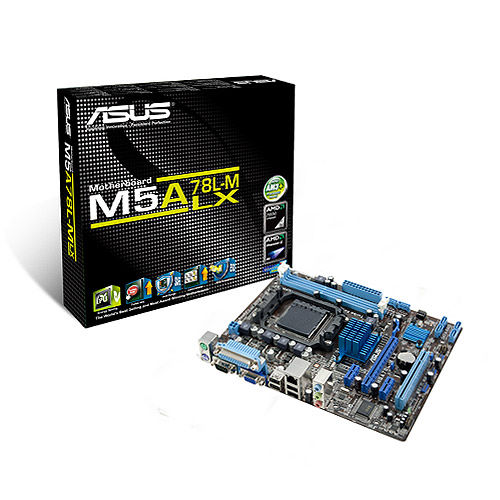
The previous Q6600 motherboard has some fault so it was not reused.  I got a deal on an AMD Phenom II 1055 6 core CPU and Asus M5A78L-M LX Motherboard from Microcenter in a bundle deal for around $100 about 6 months ago.  With such bundles, you are at the mercy of the bundle for the features of the motherboard.  But this one has a very good selection for a basic unit:
  • Integrated video (saving money and power on a video card).  VGA for switching.
  • 6 SATA ports
  • A legacy PCI card slot
  • Fair number of USB 2 ports.
  • mATX form factor - although the case can handle huge boards, if you don't need it, the space is welcome.
For a server, you want to minimize the amount of extras you add to save power and cost.   What I did end up adding, for features and because I had parts on hand:
  • 4 port USB 3.0 PCI-Ex1 card
  • 4 port SATA II PCI Card
  • 2 sticks of 4GB AMD PC3 memory that was on a deal from Slickdeals for $9.95/stick during the last low in prices.
I could have gotten a more modern motherboard with more capabilities but again I had "the bundle" deal and these cards were from previous server/PC upgrades so they were bought and paid for.  The PCI card will be a big bottleneck for server use but I only have a DVD drive and the server OS backup drive on it at present, freeing up motherboard SATA ports for real use.  The USB 3.0 ports are handy for external drives.  The card was a noname brand from the far east.  No driver disk found and WHS didn't recognize it.  A search on Google was sparse but led me to the VIA website where there were qualified drivers meant for manufacturers but they worked fine.

For drives, I wanted to get a few big ones and be done with it but I did not want to blow the budget if I did not have to.  The capacity needs were met after some scrounging - I had some 1 and 2 TB drives from an older HP Server and other uses.  I repurposed two 1 TB drives and two 2 TB drives for storage, putting them in a 4 bay caddy that was splurge #2 from Microcenter as it made placing drives easier than screwing them into the Armor case.  An older 750 GB drive serves to back up the boot drive.

So what did I use for the boot drive?  I had a 320 GB drive from the old PC that would have done fine as well as a 300 GB 10,000 RPM drive (but I wanted to keep that OS image).  Splurge #1 was getting a refurb 180 GB Corsair SSD on clearance at Microcenter.  WHS 2011 wants at least a 160 GB boot drive (although a hack will get that to 60 GB).  WHS can be pretty pokey when it comes to access especially the boot and console access.  That has always bothered me to an SSD was the way to go.  And it works, console startup is an order of magnitude faster.

I took my time on the hardware build, removing the old PC parts, getting all the dust out, getting the new motherboard ready with the CPU and stock cooler and RAM sticks.  The harder part was the drive caddy mounting and manufacturing an SSD mount from an old 2.5" bay insert as I was saving money from buying a commercial kit and the old 2.5 to 3.5 fat rails don't work with the SSD.

The cabling is as clean as one can generally make it if the motherboard mount does not have cutouts.  If this build was in my desktop Corsair case, the wires would be 98% hidden but this vintage case did not have those and I was not going to drill out large holes and ensure the sharp edges were taken care of.  That's ok - this is a server and not for show.  The airflow is not impeded by the wiring so all is good.  The case has a fan up front and back and a large side fan so for a server it's well ventilated (unlike my production server.  It's case was pre-active cooling so I rigged an intake fan in a nonstandard bay and out the back, it will be retired in the next couple years.

My choice of Windows Home Server 2011 is my own.  I have used WHS since it first came out, having used Windows XP for a server before that.  My home does not have any Macs and Linux is only on the electronics.  The WHS backup feature has saved the bacon a number of times and the file sharing works well enough for family use.

Time spent copying files off the HP Server not on the main server then all the server file shares to the new server.  I suggest Microsoft RichCopy (free and a bit newer than Robocopy but still 4+ years old).

I moved an external 3 TB drive off the main server used for backup of important files and placed it on the new server as the old server's USB3 drops the drives off every now and then.

So now we have our data on a WHS 2011 primary box with the new server as a server clone and the external drive as a last chance backup.  I am still weighing off-site backup alternatives, we have many files secure but it does not work in a dynamic environment.  With several hundred thousand pictures, cloud storage could get pricey.

So that's my setup for now.  Working on all of these issues was my main hobby for many years and I enjoy doing it but I have been away from the embedded electronics for too long and I have some cool items from YourDuino.com and Adafruit to get assembled.

Thursday, May 16, 2013

New: Microcenter stockup, RasPi Camera, and more

Several items for today.  First, Microcenter is continuing their expansion into electronics.
Pi now served at Microcenter (White Boxes)
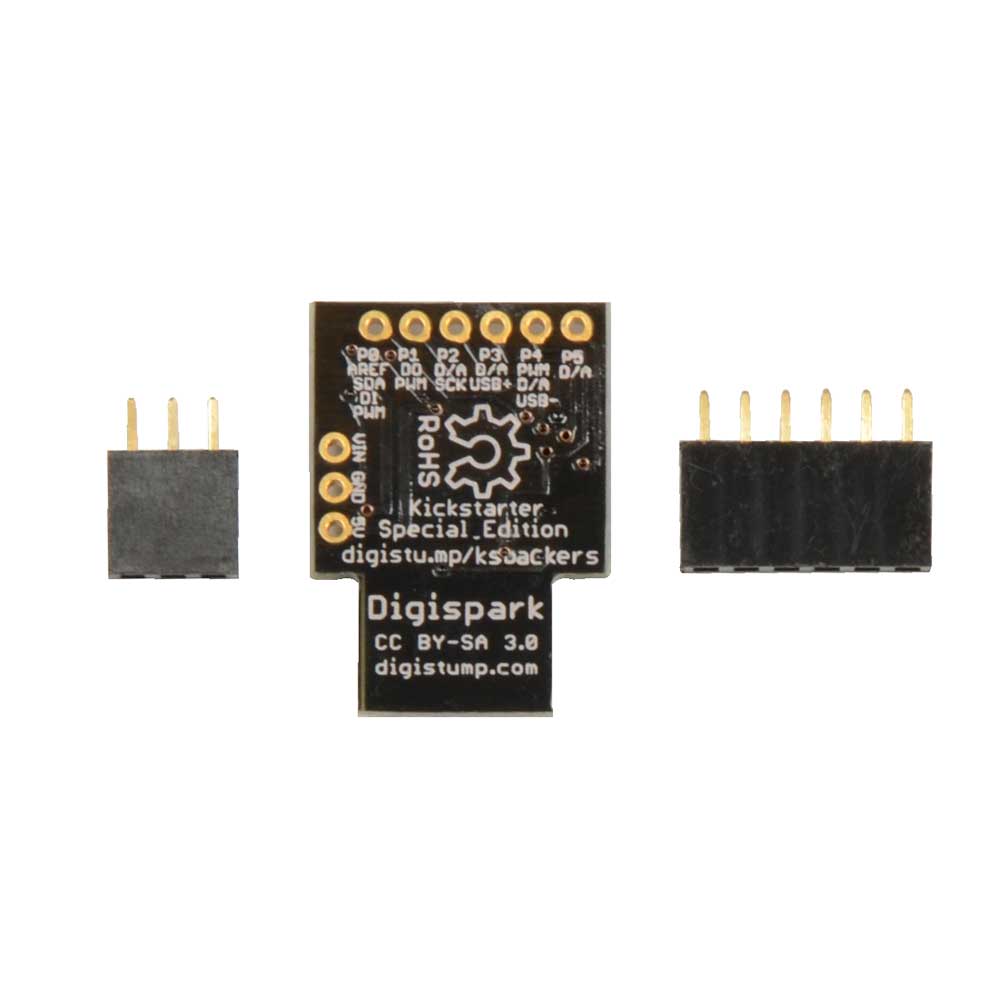
Their stock of Raspberry Pi is complete with many Model B units (in slim and large boxes) at $39.99.  Digging in, I found 3 Model A units among the others at $29.99.  I found three cases (lower left) elsewhere and moved them to the same shelf.  Their semi-monthly circular is due soon, I have a feeling they might discount the Pi.  I picked up one of the $5.99 Digisparks to play with :-)

They have expanded their stock of Sparkfun products.
Sparkfun blister packs at Microcenter

They also have many kits by NightFire Electronics.  New to me.  Their website to browse is at http://vakits.com/.

Finally I picked up one of the Digispark boards as I did not get in on the Kickstarter as it was my early days rediscovering electronics.


Raspberry Pi Camera Arrives

I'll hand it to Newark/Element 14, they are efficient at filling Raspberry Pi camera orders.  They shipped in an envelope that was crushed a bit and not fully sealed but everything was there.  Projected project: A wifi camera for outside if I can find a case to hold it without getting wet.  Ideas?
The camera is smaller than I expected
This week from China

I order some parts from China when I am not in a hurry and want good prices.  This week I received an RS232 TTL to signal level converter board using the MAX3232.  Not bad for $1.25 shipped via eBay.


Sunday, April 28, 2013

Microcenter Deal for 4/29: Digispark $5.99

Microcenter continues to feature a loss leader in do-it-yourself electronics.  Starting Monday 4/29 for the next two weeks they feature the Digispark tiny Arduino-type controller for $5.99.

This board was originally offered on Kickstarter at $10-$12.  Their pitch:
We set out to build a little brother to the wonderful Arduino line of development boards - we were tired of leaving our valuable Arduino's behind in projects, or worse, ripping apart old projects to build new ones! We also felt the Arduino was too big and powerful for many projects where we only needed a few pins, or an SPI or I2C bus. And so the Digispark was born! To us, the best things about the Arduino is the community, the easy of use, and the IDE - by making the Digispark an Arduino compatible development board all of those remain common. Plug it in, power your project with USB or external sources, program it with the Arduino IDE, and easily use existing Arduino code! But with its small size and low cost you can feel free to leave it in your project, give one to a friend, and use them everywhere!
The current direct price from Digistump is $8.95.

The Digispark has been offered by Microcenter at the $10 level but now, as a loss leader, they are advertising it for the next two weeks at $5.99.  They also have a good selection of companion and expansion boards.  Please check the website for availability both online and in stores.

If you would like some ideas on how to use Digispark and interfacing to other circuits, see the extensive wiki at http://digistump.com/wiki/.

If you need some microcontroller power in a small, affordable package, this may be the ticket for you.

PS Their price for the Arduino Uno has risen in the past month from $15 to $20 now to $25.

Wednesday, April 24, 2013

Raspberry Pi Model B now at Microcenter

Microcenter stores have started to carry the Raspberry Pi Model B for $39.95.  It's new so it isn't in their circular.
Pi's (center) along with other items like Sparkfun and Parallax items
If you'd like to order online, here is the link, same price.

As you can see from the picture, they had not even put them on the shelf, they were in the ubiqitous "new stock pile cart".  As the store was undergoing renovation (taller shelves, more room for more stuff), I will not complain too much as I hope they expand the electronics parts area.

Thursday, March 21, 2013

Digispark and Tinkerkit now at Microcenter

I went trolling at our local Microcenter store's Maker section.  Besides $14.99 Arduino Unos, I was surprised to see additional items added to their lineup:

First is the Digistump Digispark line.  Started on Kickstarter, these boards are wonderful for smaller projects  both in low prices and big flexibility.  The board is $9.99 and they have a full line of shields.


Second is the Arduino Tinkerkit line.  Formerly only available on the www.tinkerkit.com and Arduino.cc stores (and priced in expensive Euros), now we have them in the US.  While not as good a value as other parts, they have them including some sets and individual sensors.  I did NOT see any of the connecting cables which would limit the ability to use them.  Get your Arduino Esplora at Radio Shack and consider adding Tinkerkit components.

SO Microcenter is becoming quite a player in the Makerspace.  I would like to see them organize their products so they are easier to browse.  But overall I'll take quantity over quality.

Sunday, December 2, 2012

MicroCenter Maker Parts Expansion

As I had hoped, MicroCenter has increased their stock of electronics and Maker kits.  Parts from Arduino, Sparkfun, Maker Shed and Parallax are included.

They are also selling Arduinos at good prices.  I confirmed they are official models (it was unclear from print and online ads).  Their sale has the Arduino Uno for $17.99 (usually $19.99), Ethernet Shield $29.99, Arduino Ethernet $44.99, Mega $34.99.  The prices on other items appears to follow retail pricing, the clone Osepp Uno is $29.99 as is the Sparkfun Uno.  Sadly no Arduino Due parts spotted.

Now, hopefully Makers get the idea and frequent brick and mortar shops like MicroCenter, Radio Shack, etc. to buy items so they can make a profit.  And there is room to do this - while the online stores are convenient and prices are good, there are times when one is making a project when you want a part NOW, not a week via mail, not a month from China.

There is always the possibility MicroCenter could have a sale post Christmas (and post gift cards, usually around the beginning of the year "end of year sale").

Tuesday, November 13, 2012

Deals at MicroCenter

Last month, I blogged that MicroCenter had been touting their "Arduino" (which turned out to be a Ghio clone) for $19.99.  Today's ad is out and the new and improved prices are out.  They state they have the Arduino Uno Rev 3 for $17.99 (item # 869016) and the Mega 2460 Rev 3 for $34.99 (item # 864504).  No sign they are the clone models in their ad.  If that is the case, their Mega costs what Radio Shack charges for the Uno, the prices approaching half what the maker shops charge.
Such pricing could threaten Radio Shack's foray into the Maker market.  I hope not, I have encouraged them to get back to their golden days of electronics.  I spent much of my teen years pocket change buying Radio Shack parts and books.

If you'd like a Maker's kit, MicroCenter has the Sparkfun Inventor's Kit at $69.99 (item # 434324).  It was selling at $99.99 but Sparkfun recently redesigned the box so this is last year's box (link to current model) but it is still cool and $30 off.

If you like PC's, it's hard to beat some of MicroCenter's prices.  They have several stores around the US (yes, there is one nearby here) but you can get most of the same prices online (except processors which are only discounted in-store).