Showing posts with label PC. Show all posts

Sunday, July 12, 2015

In the Windows 10 Era: Microsoft Wins, Intel and AMD Vie for Scraps

For the last 25 years, there has been a dominance in the computer industry: WINTEL, a nickname for the Microsoft & Intel dominance.  It has varied over the years - AMD rose up to challenge Intel, Microsoft has had challenges including government charges and Apple.
How did they do it: Microsoft built Windows versions which used more system resources.  Intel would build processors (and chipsets, and other items) that would be more powerful to meet Windows' demands.  With special catering to business and enthusiasts, this teaming provided growth and revenue for both companies year after year.  Governments investigated various times when dominance was against consumer rights but generally the progress was steady.

The entire mountain is now in collapse.  Let's look at things:

Software

After the failure that was Windows Vista, corporate clients have stuck with Windows XP basically until the bitter end.  This has reduced Microsoft's income from sales of operating systems.  Windows 7 has been adopted by many but corporations have trimmed IT budgets to the point where what IT staff have been left have not wanted to move their constituency off XP and Windows Server 2003.  This late switching costs Microsoft revenue.  

Microsoft has also attacked windmills left and right - Lotus, dBase, Wordperfect, Google, Apple, many more over the years - whenever they foresaw a threat, they would try to outdo the threat through skill or maneuvering, always using up valuable resources (usually to little end for the consumers).

Most shops shifting off Windows XP have chosen Windows 7, lowering revenue and compatibility of the current Windows 8 frontline system.

Hardware

The confluence of several issues:
1) With the lag in software sales, the amount of new hardware being purchase has slowed, with chip sales in a huge slump.
2) The tablet market slowed sales of traditional desktop and laptops significantly.  Intel has been late to the low power mobile space with cool, efficient, powerful chips.

Intel has hoped to keep the high end computing market going, especially as new servers are required.  But Intel has had problems with their 14nm chip fabrication, needed to reduce chip power and size (size = more chips per wafer, making more money).  Intel's process tick-tock release schedule (improvements, then shrink in size, then more improvements, etc., is seriously stalled with newer chips not on a new process or with significant hardware improvements.  Some say the hardware improvements have actually been stagnant since 2011.  Intel's withheld 6 core and higher core chips from affordable consumers.

Hardware's Downfall: Windows 10

With Steve Ballmer gone, Microsoft's new CEO is trying to save the company in the face of the above scenario coupled with threats from Apple and cloud computing.  Windows 10 upgrades for many for free will be a huge boon to capturing customers.  And Windows 10 can run on some hardware that is 8 to 10 years old, breathing life into hardware already paid for.

Few people will now be buying many new Intel (or AMD) chips just to run Windows 10 like they might have for new versions of Windows in the past.  Why when it runs well on current and past hardware?    Intel and AMD stock has tanked and Intel has lost some key management.

The key is to watch what companies may do - stay on Windows 7 until end of life or adopt Windows 10.  Microsoft must include features in the OS worth upgrading to - both for home and office users.  Do not do it through past trickery, but do it through winning over customers with superior product & service.  Focus on your core and that's what they've done this month.

Hardware - a Possible Path

Intel must cut hardware costs.  They have a very high margin for current chips.  If new fabrication plants will be spun up slower, funnel the money into cheaper chips, fueling savings and making stock holders see Intel is not down & out.  Also allow for cheaper 6 core chips (about $350) and 8 core chips ($499).  They are in your servers, allow them on the desktop.

If Intel cannot move hardware down a bit, then perhaps AMD can move in in the budget space.  But they'd better look to advertise how well their chips run Windows 10.

Where do you see the market?


Sunday, June 30, 2013

Home Server Backup Build

I have not posted in a bit as my project took a bit of time.  I have been planning a new home server for several months.  The list of requirements:

  1. Be able to accommodate many drives for storage
  2. Use Windows Home Server 2011 
  3. Have as many CPU cores as economical
  4. Motherboard should be economical
  5. Re-utilize parts from my previous PC
  6. Maximum capability at a low cost. 
Numbers 1 and 5 came in via my previous case - a Thermaltake Armor case from about 6 years ago.  I ordered it a bit hastily having bolted on a TigerDirect deal on the Q6600 which was bad-ass back then.  The Armor is a beast of a case and accommodates a ton and a half of drive slots.  Great for a server but it was overkill for an enthusiast PC (and those wing doors and other things drove me crazy).

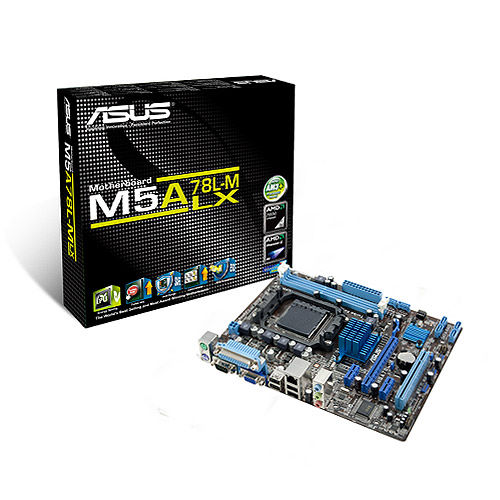
The previous Q6600 motherboard has some fault so it was not reused.  I got a deal on an AMD Phenom II 1055 6 core CPU and Asus M5A78L-M LX Motherboard from Microcenter in a bundle deal for around $100 about 6 months ago.  With such bundles, you are at the mercy of the bundle for the features of the motherboard.  But this one has a very good selection for a basic unit:
  • Integrated video (saving money and power on a video card).  VGA for switching.
  • 6 SATA ports
  • A legacy PCI card slot
  • Fair number of USB 2 ports.
  • mATX form factor - although the case can handle huge boards, if you don't need it, the space is welcome.
For a server, you want to minimize the amount of extras you add to save power and cost.   What I did end up adding, for features and because I had parts on hand:
  • 4 port USB 3.0 PCI-Ex1 card
  • 4 port SATA II PCI Card
  • 2 sticks of 4GB AMD PC3 memory that was on a deal from Slickdeals for $9.95/stick during the last low in prices.
I could have gotten a more modern motherboard with more capabilities but again I had "the bundle" deal and these cards were from previous server/PC upgrades so they were bought and paid for.  The PCI card will be a big bottleneck for server use but I only have a DVD drive and the server OS backup drive on it at present, freeing up motherboard SATA ports for real use.  The USB 3.0 ports are handy for external drives.  The card was a noname brand from the far east.  No driver disk found and WHS didn't recognize it.  A search on Google was sparse but led me to the VIA website where there were qualified drivers meant for manufacturers but they worked fine.

For drives, I wanted to get a few big ones and be done with it but I did not want to blow the budget if I did not have to.  The capacity needs were met after some scrounging - I had some 1 and 2 TB drives from an older HP Server and other uses.  I repurposed two 1 TB drives and two 2 TB drives for storage, putting them in a 4 bay caddy that was splurge #2 from Microcenter as it made placing drives easier than screwing them into the Armor case.  An older 750 GB drive serves to back up the boot drive.

So what did I use for the boot drive?  I had a 320 GB drive from the old PC that would have done fine as well as a 300 GB 10,000 RPM drive (but I wanted to keep that OS image).  Splurge #1 was getting a refurb 180 GB Corsair SSD on clearance at Microcenter.  WHS 2011 wants at least a 160 GB boot drive (although a hack will get that to 60 GB).  WHS can be pretty pokey when it comes to access especially the boot and console access.  That has always bothered me to an SSD was the way to go.  And it works, console startup is an order of magnitude faster.

I took my time on the hardware build, removing the old PC parts, getting all the dust out, getting the new motherboard ready with the CPU and stock cooler and RAM sticks.  The harder part was the drive caddy mounting and manufacturing an SSD mount from an old 2.5" bay insert as I was saving money from buying a commercial kit and the old 2.5 to 3.5 fat rails don't work with the SSD.

The cabling is as clean as one can generally make it if the motherboard mount does not have cutouts.  If this build was in my desktop Corsair case, the wires would be 98% hidden but this vintage case did not have those and I was not going to drill out large holes and ensure the sharp edges were taken care of.  That's ok - this is a server and not for show.  The airflow is not impeded by the wiring so all is good.  The case has a fan up front and back and a large side fan so for a server it's well ventilated (unlike my production server.  It's case was pre-active cooling so I rigged an intake fan in a nonstandard bay and out the back, it will be retired in the next couple years.

My choice of Windows Home Server 2011 is my own.  I have used WHS since it first came out, having used Windows XP for a server before that.  My home does not have any Macs and Linux is only on the electronics.  The WHS backup feature has saved the bacon a number of times and the file sharing works well enough for family use.

Time spent copying files off the HP Server not on the main server then all the server file shares to the new server.  I suggest Microsoft RichCopy (free and a bit newer than Robocopy but still 4+ years old).

I moved an external 3 TB drive off the main server used for backup of important files and placed it on the new server as the old server's USB3 drops the drives off every now and then.

So now we have our data on a WHS 2011 primary box with the new server as a server clone and the external drive as a last chance backup.  I am still weighing off-site backup alternatives, we have many files secure but it does not work in a dynamic environment.  With several hundred thousand pictures, cloud storage could get pricey.

So that's my setup for now.  Working on all of these issues was my main hobby for many years and I enjoy doing it but I have been away from the embedded electronics for too long and I have some cool items from YourDuino.com and Adafruit to get assembled.

Sunday, November 11, 2012

Backup, Backup, Backup

I think I lost a 3TB drive on my Windows Home Server 2011 box today.  All the client PC backups were on that drive but no data that I recall so it's not a great loss.

Of course I have not automated a backup of the servers pictures, videos, and documents.  I do have a Microsoft Richcopy script to do so manually to another 3TB drive on that server.  I miss the Drive Extender technology in the old Windows Home Server to manage a copy of the data that would survive a one hard disk crash.

My last ditch backup is on such a Windows Home Server V1 box.  I haven't had that running in awhile so there are 23 patches to apply before looking to make a copy there.

Maybe my life will slow down enough so I can get all the solutions automated and bulletproof.  Or Microsoft could make an alternative to do it for me (Apple - hah!  They abandoned the server space).  There are some interesting articles on using Windows 8 and the Storage Spaces capability acting as a home server but I'd like something more tried & true.