Showing posts with label IBM Portable Computer. Show all posts

Sunday, February 17, 2019

Using EGA and VGA video cards in IBM 5150 PC, 5155 Portable, and 5160 PC/XT Machines


I first ran into video card issues debugging the IBM 5155 Portable computer. Besides no video it beeped one long, two short on startup. I did a lot of video card switch and jumper gymnastics to try to get that straight when I should have done more digging online. Two switches on the motherboard would have probably done the trick.

So I have compiled a short primer on using EGA and VGA displays on these machines. Most of the info is from various pages of the excellent minuszerodegrees.net site but in multiple places. Hopefully having this in one place helps others.

Do note: there are alot of caveats in this and not all cards will work in all computers. One reason I don't make a compatibility table (yet) is others have done so and it gets expensive testing.


Motherboard switch settings for EGA and VGA (BIOS-containing) Video Cards
Version 1.00


IBM 5150 PC

·       The IBM 5150's motherboard must have the third BIOS revision, 10/27/82, for EGA/VGA
o   The ROM has the IBM part number of "1501476" printed on it.
o   On the 5150 motherboard, the ROM in socket U33 contains the BIOS.
o   Due to bugs, this BIOS requires that all 4 banks of motherboard RAM be populated.
·       The two video switches on SW1 (shown below) must be set for:  5=ON, 6=ON

·       Of SW1 and SW2, SW1 is the switch block closest to the center of the motherboard.
These settings apply to both the '16KB-64KB' and '64KB-256KB' versions of the 5150 motherboard.

·       If your IBM 5150 contains an XT-class hard disk controller, then be aware that some VGA cards may have a resource conflict with it.

·       Known working VGA card lists: minuszerodegrees, vcf


IBM 5155 Portable PC

The IBM 5155 contains an early version of the IBM 5160 motherboard.

So, see below to see the 5160 motherboard switch settings, noting that the two switches for video card type are normally set to CGA (because an IBM CGA card is the card supplied by IBM in the 5155).


IBM 5160 PC/XT

·       The two video switches on SW1 (shown above) must be set for:  5=ON, 6=ON

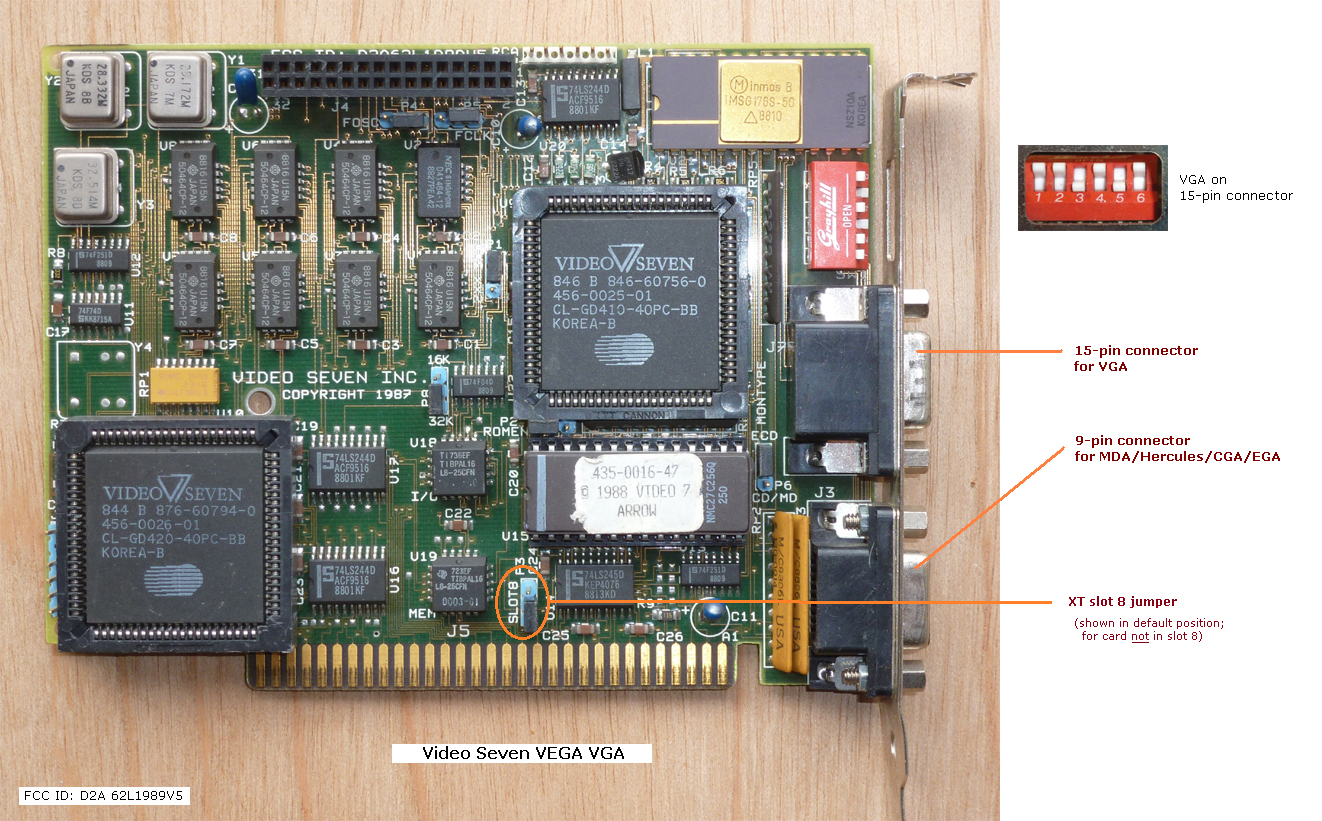
·       Do not place the card in expansion slot 8 (the slot nearest the CPU) unless the card specifically supports slot 8.  Cards that are slot 8 compatible usually have a 'slot 8' jumper.

·       If your IBM 5160 contains an XT-class hard disk controller, then be aware that some VGA cards may have an address space resource conflict with it.

·       Known working VGA card lists: minuszerodegrees, vcf


Boot Error Beep Codes for Video

1 long and 2 short beeps                    Video (Mono/CGA display circuitry) issue
1 long and 3 short beeps.                   Video (EGA) display circuitry
1 beep, blank or incorrect display       Video display circuitry.

·       Make sure the SW1 switches are in the correct 5=ON 6=ON position (above)

·       Ensure there are no conflicts between VGA BIOS/addresses and other cards

·       Be sure the video card configuration switches are correct (this could be hard without documentation)

Suitable VGA cards

You must not assume that because a particular VGA card works in an IBM 5160 (IBM XT) that the same card will also work in an IBM 5150.
The documentation for some 16-bit VGA cards indicates that they work in an 8-bit expansion slot.  You should not expect that to mean all 8-bit slots.  Many such cards are intended only for an 8-bit slot within an AT-class computer, and will not work in an IBM 5150.  The maker's documentation for the card will indicate whether the card will work in an IBM 5150.
Some people have discovered that certain 8-bit compatible 16-bit VGA cards can be made to work in a 5150/5160 if the 8088 CPU on the motherboard is upgraded to a V20 CPU. This may not work, though.

VGA card configuration

Some VGA cards have configuration switches and/or jumpers.  An example is here.  Refer to the card's documentation to ensure that those switches/jumpers are set appropriately.  For the switches, do not confuse the off position with the on position.
16-bit VGA cards that are known to work in an IBM 5150 PC usually (not always) need to be manually configured to run in 8-bit mode.  Refer to the card's documentation, because configuration is done differently on different cards.


Saturday, February 9, 2019

IBM Portable PC 5155 Video Connection


Since buying one IBM PC, I have now progressed to buying 4: 1 PC 5150, 2 PC/XT 5160, and an IBM Portable 5155. Two types of COMPAQ portables are on the way. Help!

Here I will focus on the IBM Portable PC Model 5155. I bought this off of Craigslist from a gentleman who found it in a thrift shop. It was a bit rough, video was there but only tearing lines, the brightness know is missing and one keyboard retention foot is broken.

Get the manual

I suggest you go to this page to get a copy of the maintenance manual for this computer:
https://ibm.retropc.se/hmr/hmr.html 

Opening the IBM 5155 Computer Case

Opening up the PC, you remove 6 screws located around the front of the PC looking at the CRT and disk drives. Pull the case off. Remove the internal RF shield on the PC half via 3 screws around the shield. Bag the screws for safe keeping.

My Experience - ugh!

The short of it: Try to use a CGA card, preferably an IBM CGA card or close compatible.

I looked around the video card. There was a loose twisted pair of wires. Black and Yellow on a 4 pin header. Some Googling found this was composite input to the video section, yes we found why there was no text on the display!

The video card inside was an Everex EV659. Interesting as this is billed as CGA/MDA/EGA compatible. Like many vintage hardware pieces/cards, the online documentation is pretty sketchy.

But for the life of me I could not get composite video out of the header pins.

Maybe it's this bad 2.2uf tantalum capacitor next to the header? Time to get some more capacitors from Digi-key!

At this point I decided to use the Everex card in another PC. It's flexibility is better suited to a desktop. So I grabbed a known good CGA adapter, the CGA clone I documented in this earlier post.

The composite out didn't correspond to the IBM CGA header. Nearly all the early IBM compatible 8-bit hards have a 4 pin header for composite video out, which may be marked RF adapter as that would be how an RF modulator would connect so a OC could display to a TV of the time without composite in. I know of no one that actually used a TV, they got a mono monitor and used that if an IBM monitor was too expensive (it often was).

I did confirm with a CGA monitor that the portable booted correctly (with a DOS Boot Disk). So the PC is ok.

Connecting the IBM Portable 5155 to a display card

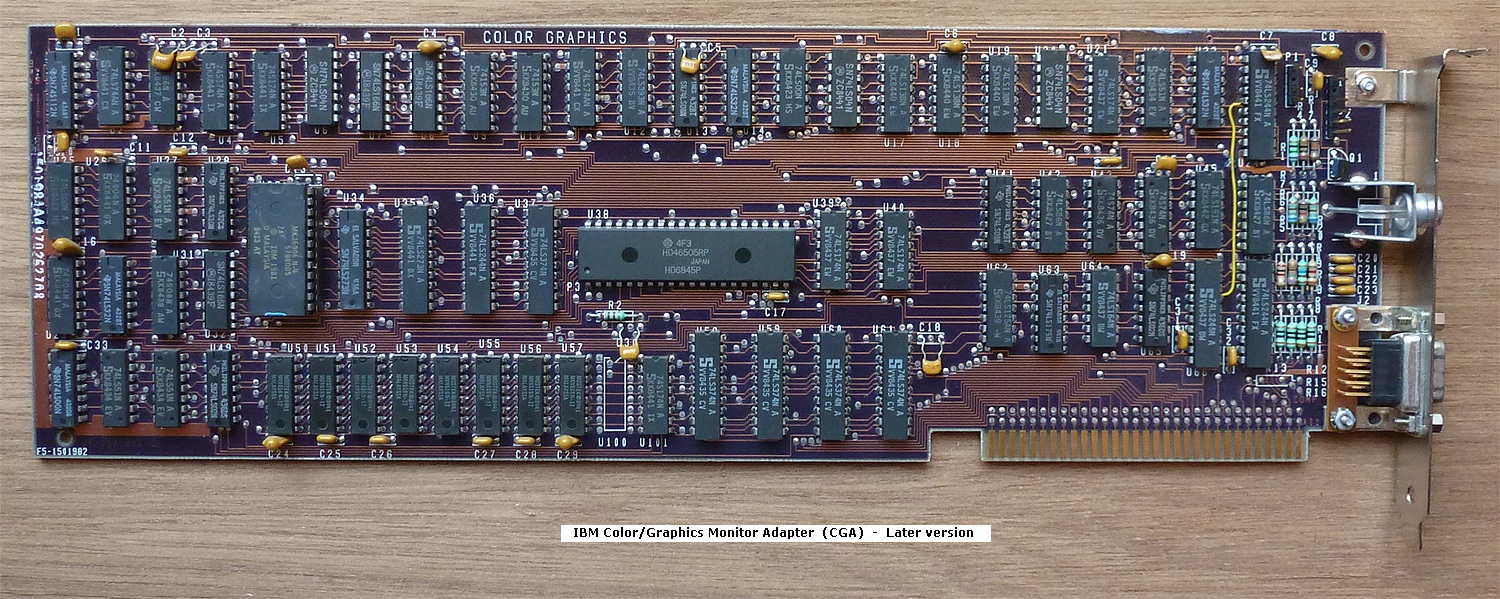
Determine the composite video out of your display card. For the official IBM CGA card, here is the manul picture:
So the Yellow wire (Composite In) should in theory go to CGA P1 Pin 3 and the Black wire (Ground) should go to P1 Pin 4.

The picture on minusZerodegrees.net shows this same connection for a CGA card.

If you do not use an official IBM CGA card, the connections and picture may not be correct! As it turns out, my clone CGA card apparently has the header upside down from the official card!


I used male to female jumper wires as the connection is very tight and the clone card has 4 pins where the connector has pin 3 keyed (Pin 2 missing) so the 5155 video in cable doesn't fit.

Using non-official CGA or other cards

The card you plan to use should have a good video composite out and ground. Many cards have RCA jacks out the back that provide this, but it is awkward and unsightly to have a connector to the jack snake back in to connect to the display's Yellow and Black connection.

I suggest if you are probing your video card for composite out to use an external monitor (if you have a composite monitor) so you don't accidentally put that +12V line onto your 5155 video in, as it might damage it. I have a small LCD composite monitor I found dumpster diving but composite monitors can be found in other places, including old TVs with composite in. Maybe even an old VCR with video inputs and a better system for output.

Can I get VGA on the display (I don't think so)

If you were thinking of going up to VGA, note that there are a limited number of vintage VGA cards that work with 8 bit IBM PCs. See this list for some known to work. Also such cards probably don't have video out or at least one that will work better than CGA. CGA was designed for regular NTSC or PAL composite monitors of the era. VGA was designed for specialty monitors.

Perhaps you could replace the video section with something that will display VGA (or better). This would be a non-vintage mod but it sounds interesting!

Conclusion

I'm glad the video section was ok as I am not a tube video expert by any means. I like the portable format, they were the first IBM PCs I actually used for school work. I even wrote Unix clone programs like for mv, ls, etc.

If you have more info on the IBM Portable 5155 beyond the excellent documentation at minuszerodegrees.net, please share.

Bonus: If you see the display pictures at the top, what is strange about that directory list? Let me know on Twitter @mikedigitalhome